You have a caption and image ready, and you want your assistant to put them on the right Instagram account, Facebook Page or LinkedIn account. On November 20, 2026, we could not verify a first-party MCP connection that you can use for ordinary publishing on any of the three. Meta names an Instagram Business MCP in its documentation index, but its available-server list gives no publishing endpoint for it. Meta and LinkedIn describe advertising connections separately. For an ordinary post, start in the social app or use a scheduler connection that supports your account and format.
A real example
This finished post was published through Boomp from a paying listing agent's own website. The West Michigan lakeshore agent is shown without her name. It shows the caption and image that travel together when you prepare a photo post.
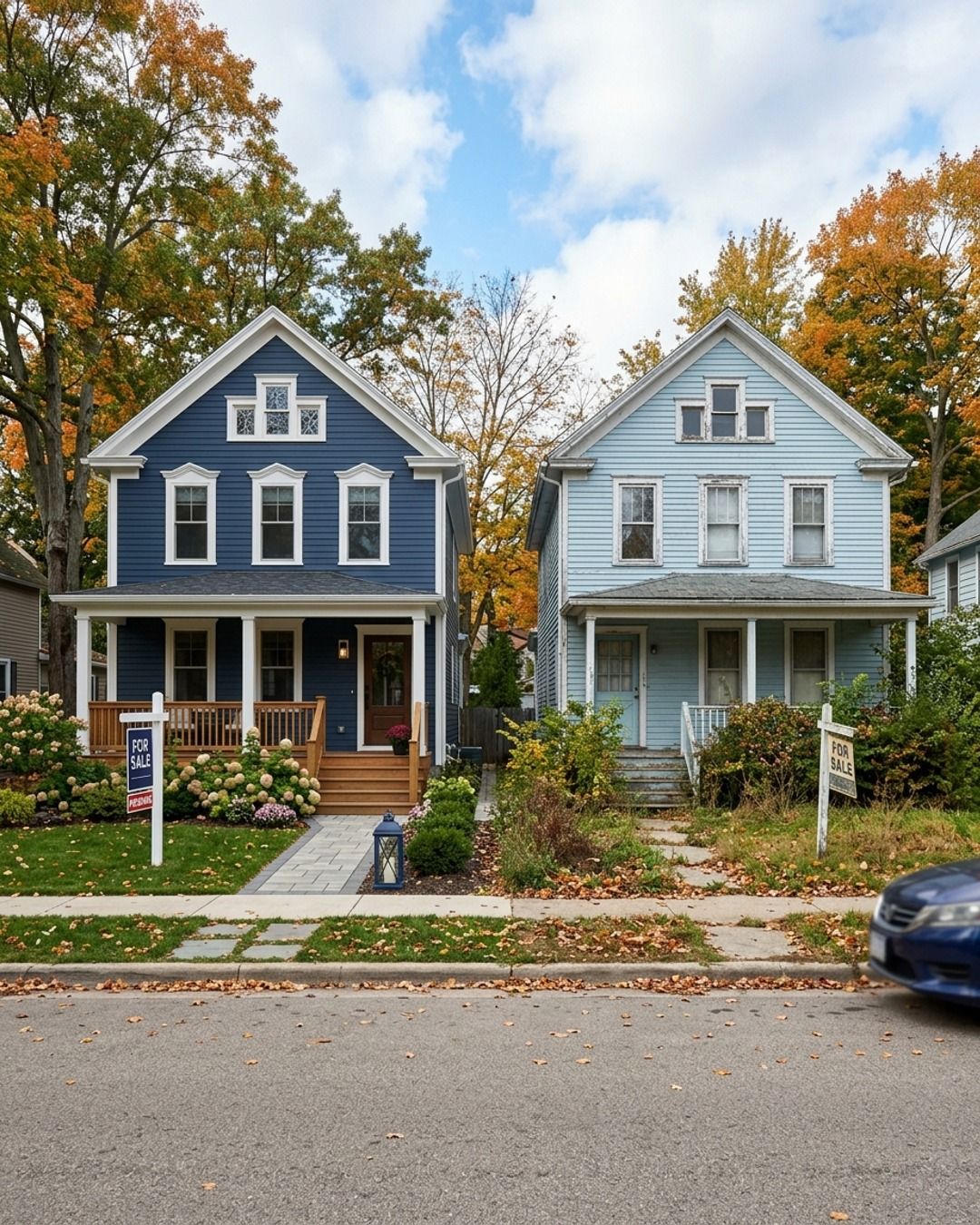
Ever wonder why two nearly identical Saugatuck homes sell for wildly different prices?
Same square footage, same bedrooms, same street.
One sells in a week over asking; the other sits for two months.
It usually comes down to things a buyer feels before they can even articulate them.
It’s the way the light hits the living room or how the entryway feels the second they step inside.
If a house feels finished—fresh paint, zero clutter, a clear sense of space—it reads as move-in ready.
That perception alone moves the needle.
The other factor is the pricing strategy.
If you list high just to leave room to negotiate, you kill the momentum of those first fourteen days.
That initial rush of attention is your most valuable asset, and you can’t get it back once the listing feels stale.
Prep and pricing aren't just details.
They are the strategy.
When you’re touring a home, what’s the one thing that makes you immediately want to live there—or immediately want to leave?
Check the meaning of the caption, the image and the final files together. If a reviewer changes one, make sure the person who publishes sees the approved version.
Which route publishes your post?
A connector gives your assistant tools that a service makes available. The service may let your assistant read an account, prepare a draft, schedule a post or do only advertising work. Check the documented action before you connect anything.
| Destination | What we could verify on November 20, 2026 | Where to publish an ordinary post |
|---|---|---|
| Instagram professional account | Meta's index names an Instagram Business MCP. The available-server list shows no endpoint for it, and the linked page gives no setup instructions. | Use Instagram, a compatible scheduler or the Instagram API with the required publishing permission. |
| Facebook Page | Meta describes MCP tools for Ads and for app developers. The available-server list gives no connector for publishing ordinary Page posts. | Use the Page's own publishing tools, a compatible scheduler or the Pages API. |
| LinkedIn profile or Page | LinkedIn announced a beta for ads and audience work. The sources we read gave no first-party MCP publishing action for ordinary posts. | Schedule from your profile or Page, use an eligible scheduler, or use the Posts API. |
We checked Meta's available servers, its documentation index and its Instagram Business MCP page. The last page showed a heading only when we read it. We also checked LinkedIn's MCP beta announcement. Availability can change. Use each vendor's own setup instructions when they list the organic posting action you need.
Match the destination before you connect
For Instagram, separate your personal profile from a professional account. Meta's Instagram API notes list a publishing permission for Instagram Login. An API permission for an app does not give you a ready-made connection for your assistant. If you use a scheduler, check how it handles the account type and the photo, video or carousel you want to send.
For Facebook, check that you are publishing to a Page. Meta's Graph API overview directs Page publishers to the Pages API. A business Page and a Facebook Group have different publishing paths. A tool that posts to the Page may only remind you to finish a Group post yourself.
For LinkedIn, decide if the post is from a person or from the company. LinkedIn's Posts API documents separate permissions for those jobs. LinkedIn also explains how to schedule a profile post or a Page post. Use the native scheduler when you already have the post and only need a time.
If you want to stay in the assistant
Buffer's developer guide, read November 20, 2026, documents Facebook, Instagram and LinkedIn posting and a separate draft option. It requires media for Instagram. For personal Instagram profiles and Facebook Groups, the guide describes a reminder and a manual finish. It is Buffer's connection. You give Buffer access to the social account and your assistant access to Buffer.
Start by asking the assistant to list the connected channels with no changes. Choose one account and label it exactly as your publishing tool shows it. Give it a cleared caption and media you own, and ask to save a draft without a publishing date. Open the tool and check what it saved. Approve a time only when the caption, visual and destination are right. Keep the same post out of the other queue so it has one path to publication.
If you have a developer, the platform API is a separate option. Ask who maintains access, what happens when credentials expire and how you can tell whether a post went out. If you publish only now and then, a built-in scheduler may take fewer steps than connecting a second service. See the Buffer MCP guide for its draft details or compare social media MCP servers if a different part of the work is missing.
When you still need the caption and image
Boomp is software that makes finished captions and visuals from a public website. The agent docs, read November 20, 2026, describe downloadable files for that job. They also describe approved text publishing on LinkedIn, Facebook, Threads, Bluesky and X after you connect an account. That text publishing list leaves out Instagram. The separate monthly plans cover website-based posts and connected publishing on supported profiles after approval, unless you turn on auto approval.
Keep one person responsible for the final caption and channel. That person checks time-sensitive facts, any claim their profession regulates, and who gave permission to use an image. Keep private customer facts out of public drafts and keep account credentials out of the prompt. We read current public documentation. We did not connect an account or publish a post for this guide.
Frequently asked questions
Is there an official Instagram MCP server for publishing?
As of November 20, 2026, Meta names an Instagram Business MCP in its documentation index. Meta's available-server list gives no endpoint for that server, and the linked page only showed a heading when we checked. We could not verify a Meta connector you can use for ordinary Instagram publishing. Meta documents publishing through the Instagram API for professional accounts.
Can the official Meta Ads MCP publish ordinary Facebook posts?
Meta documents its Ads MCP for advertising work such as campaign management and reporting. Its available-server list, checked November 20, 2026, does not list a connector for publishing ordinary Facebook Page posts. For those posts, use Facebook's tools, an eligible scheduler or a properly authorized integration with the Facebook Pages API.
Does LinkedIn have an MCP server for posts?
LinkedIn announced an MCP beta for advertising and audience work. We found no first-party connector that documents publishing ordinary posts in the sources checked November 20, 2026. LinkedIn documents an API for posts, with separate permissions for members and organizations. Its help center also documents scheduling from a profile or from a Page.
Can Buffer MCP save a draft for these social networks?
Buffer documents a draft option and posting support for Facebook, Instagram and LinkedIn. Connect the account inside Buffer and check the channel before you save the draft. Instagram needs media in the documented action. Buffer reports that personal Instagram profiles and Facebook Groups require a notification and manual publishing.
Does Boomp publish to Instagram from its agent product?
The agent docs read November 20, 2026 list LinkedIn, Facebook, Threads, Bluesky and X for the approved text publishing workflow. Instagram is absent from that list. The separate caption and image job returns files. For monthly connected publishing on supported profiles, check the separate Boomp app plans and keep the approval step.
How do I check a publishing connector before I use it?
Find the vendor's own tool list. Check that it names your exact account type, accepts the media you need and can save an unscheduled draft. Connect only the profile you need. Open the draft in the destination service and make sure the caption, account and status are right before authorizing a post.
Choose your next step
See how to connect your agent to use the documented caption or text draft workflow.
Get ten free posts made from your website if you would rather have the posts made. Enter a website and email to get the link. It includes images, a carousel and a short video. No account or card required.